
Step-by-Step OpenClaw Docker Compose Setup Guide: Light, Multi-Container Orchestration
Running local-first AI agents requires a delicate balance of isolation, performance, and simplicity. While manual installations allow for direct hardware access, they often result in dependency hell where Node.js versions clash, Python packages corrupt the system workspace, and local database ports conflict. On the other hand, bundling everything into a single monolithic Docker image creates massive, slow, and unmaintainable blobs.
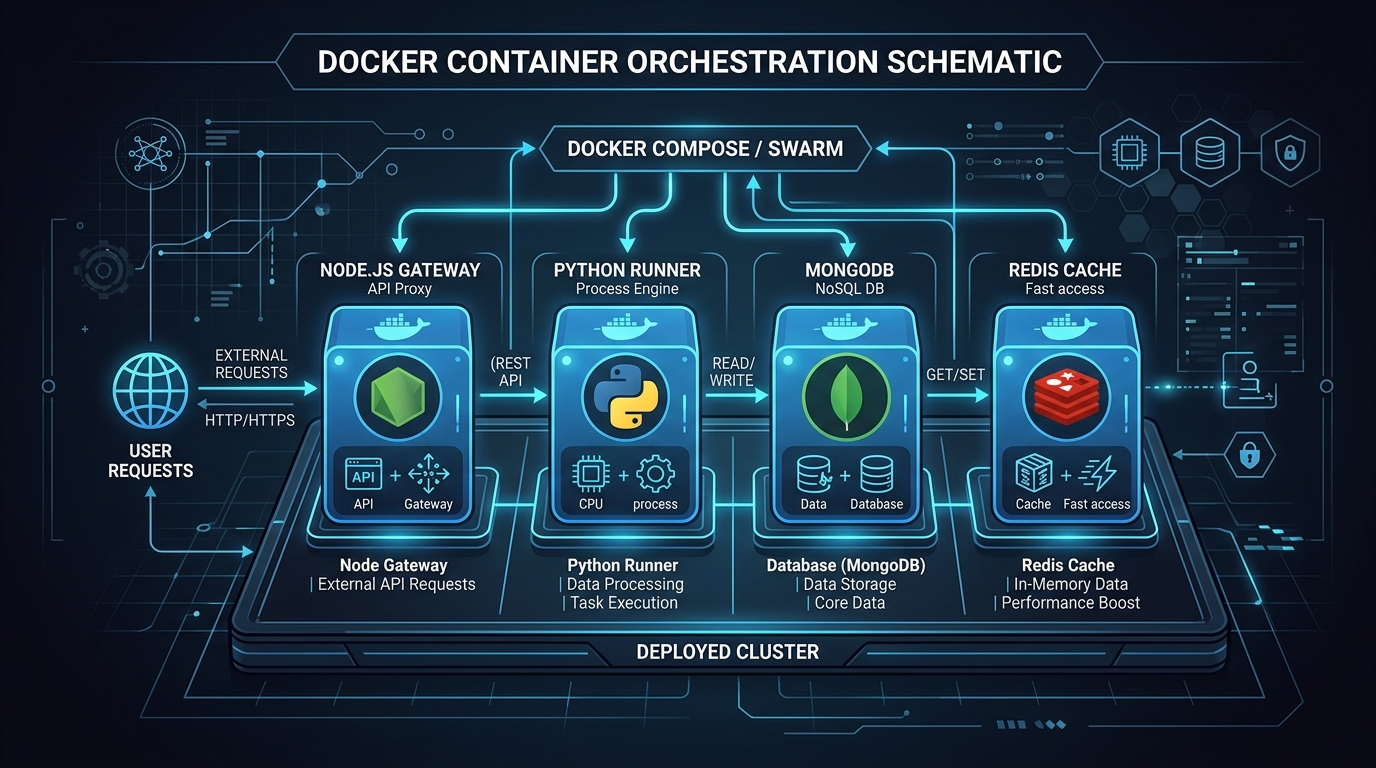
For modern engineering teams, the optimal architecture is multi-container microservice orchestration using Docker Compose. By splitting OpenClaw into decoupled, lightweight service layers—a Node.js gateway container for API proxying, isolated Python runner containers for task execution, and standalone DB services—you unlock modular scalability, sandboxed execution, and absolute reproducibility.
This guide provides the complete, production-ready operational blueprint to configure, launch, and monitor OpenClaw using Docker Compose in minutes.
Summary
| Question | Direct answer |
|---|---|
| Why use Docker Compose instead of a single fat container? | Decoupling services isolates memory and crashes, simplifies runtime updates, and enables independent scaling of Node.js gateways and Python runners. |
| How are host files accessed safely inside the containerized gateway? | Through strict Docker volume bind-mounts targeting the local workspace directory, preserving direct developer IDE edits in real time. |
| Can you run heavy local vector databases alongside this setup? | Yes. Docker Compose lets you link services like Qdrant, ChromaDB, or Redis on an isolated virtual network, avoiding exposed ports on the host. |
| What is the CPU and RAM overhead of a containerized setup? | Under idle conditions, the complete multi-container stack consumes ~180MB RAM and 0.2% CPU, making it extremely lightweight for local workstations. |
Definition: Multi-container orchestration is a deployment pattern that splits an application's architecture into separate OS-level virtualization environments (containers), using a single orchestration file (`docker-compose.yml`) to define virtual networks, volume configurations, environment inheritance, and runtime dependencies.
Quotable takeaway: Containers should not be treated as VM replacements. By isolating the Node.js gateway from the Python execution runner, you ensure that high-cpu agent processes can never freeze the API dashboard or corrupt your database state.
Why Choose Multi-Container Orchestration?
When deploying agentic frameworks like OpenClaw, the tempting shortcut is running everything in a single, heavy Docker image containing Node.js, Python, compiler utilities, and multiple local databases. This monolith approach breaks several key principles of DevOps design:
Process and Fault Isolation
AI agents regularly run untrusted code, execute long-running recursive loops, and handle heavy memory operations. In a monolithic setup, if a Python agent runner encounters an out-of-memory error (OOM), the entire container crashes, instantly taking down your gateway and your active dashboard. Decoupling them ensures the Node.js API gateway remains responsive and can automatically restart the runner.
Runtime Independence
OpenClaw's API gateway runs best on Node.js v20/v22 LTS, while different agent tasks might require specific, segregated Python runtimes (e.g., Python 3.10 for older machine learning packages, Python 3.11 for general agent use, or Python 3.12 for modern libraries). Multi-container architecture allows you to spin up multiple distinct python runners alongside a single master gateway.
Clean Network Routing
Instead of manually mapping ports on your localhost interface—which can easily conflict with existing services—Docker Compose establishes an isolated virtual network (e.g., `openclaw-net`). Services inside this network communicate securely using their service names as hostnames, exposing only the primary API gateway port `18789` to your local machine.
---
The Production-Ready docker-compose.yml Blueprint
Below is the complete, multi-container orchestration architecture for OpenClaw. It configures three independent layers:
- openclaw-gateway: The Node.js asynchronous core running on port `18789`.
- python-runner: The isolated python interpreter running Python 3.11.
- redis-vector: A light, high-performance key-value database for metadata caching and message broker routing.
```yaml
version: '3.8'
services:
redis-vector:
image: redis:7-alpine
container_name: openclaw-redis
command: redis-server --save 60 1 --loglevel warning
ports:
volumes:
networks:
restart: unless-stopped
- "127.0.0.1:6379:6379"
- redis-data:/data
- openclaw-net
python-runner: image: python:3.11-slim container_name: openclaw-python-runner volumes:
working_dir: /app/workspace networks:
environment:
command: python3 -m http.server 18790 restart: unless-stopped
- ./workspace:/app/workspace
- openclaw-net
- PYTHONUNBUFFERED=1
openclaw-gateway: image: openclaw/gateway:latest container_name: openclaw-gateway ports:
volumes:
environment:
depends_on:
networks:
restart: unless-stopped
- "18789:18789"
- ./workspace:/app/workspace
- ./config.yaml:/app/config.yaml:ro
- NODE_ENV=production
- REDIS_URL=redis://redis-vector:6379
- PYTHON_RUNNER_URL=http://python-runner:18790
- redis-vector
- python-runner
- openclaw-net
volumes: redis-data: driver: local
networks: openclaw-net: driver: bridge ```
---
Step-by-Step Orchestration and Startup Guide
Follow these sequential steps to deploy your local multi-container OpenClaw stack:
Step 1: Initialize Workspace Directory Structure
Before launching the stack, create a unified project folder on your host workstation containing your local configuration and workspace paths: ```bash mkdir openclaw-docker-setup && cd openclaw-docker-setup mkdir workspace ```
Step 2: Create a Default config.yaml File
Create a lightweight configuration file in your directory root to map the internal Docker network endpoints: ```yaml gateway: workspace: "/app/workspace" port: 18789
providers: redis: url: "redis://redis-vector:6379" runner: url: "http://python-runner:18790" ``` Note that we use service names like `redis-vector` and `python-runner` rather than IP addresses or `localhost` since they operate on the shared Docker virtual bridge network.
Step 3: Launch the Stack Headless
Write the `docker-compose.yml` code block above into a file and boot your multi-container environment in background mode: ```bash docker compose up -d ``` Docker Compose will download the slim images, build the isolated virtual bridge network, assign dynamic volumes, and boot the containers in their proper dependency sequence.
Step 4: Verify Multi-Container Handshakes
Confirm that all three services are fully operational: ```bash docker compose ps ``` Your terminal will display all containers with an `Up` status. To verify that the Node.js gateway is successfully communicating with the Redis backend and the Python environment, check the gateway logs: ```bash docker compose logs openclaw-gateway ``` Expected healthy trace: ``` [Gateway] Connected to Redis vector caching at redis://redis-vector:6379 [Gateway] Python runner handshake succeeded at http://python-runner:18790 [Gateway] Dashboard running at http://localhost:18789/ ```
---
Troubleshooting Multi-Container Roadblocks
Here are the three most common errors developers encounter when running OpenClaw in a Docker Compose environment and how to solve them.
Error 1: Gateway Fails to Connect to Redis (Timeout Error)
Your gateway container crashes immediately on startup, outputting this traceback: ``` Error: Redis connection failed: ENOTFOUND redis-vector at GetAddrInfoReqWrap.onlookup [as oncomplete] (node:dns:108:26) ``` The Cause: The gateway container is attempting to bind to the `redis-vector` hostname before the isolated Docker virtual network has finished building, or the services are not assigned to the same bridge network. The Solution: Ensure both containers are assigned to `openclaw-net` and that `depends_on` is specified under the `openclaw-gateway` block in your `docker-compose.yml`.
Error 2: Localhost Mounting and Directory Synclag
You edit an agent script on your host machine using VS Code, but the containerized agent runner cannot find the modified script. The Cause: The host folder was not successfully mounted into the container, or the relative path resolution in your volume mapping is targeting the wrong host path. The Solution: Always use absolute paths or explicit directory references (`./workspace:/app/workspace`) in your volume settings. Avoid nesting bind mounts. On macOS and Windows, ensure VirtioFS or gRPC-FUSE file-sharing is enabled in Docker Desktop settings to eliminate synchronization latency.
---
Bypassing Docker Compose Complexities with ClawLite
While Docker Compose offers an incredibly robust multi-container environment for production and advanced developers, it requires active management of virtual networks, YAML formatting, and container lifecycles.
If you are looking for the absolute simplest, zero-configuration local-first setup that completely avoids command-line container engines, the ClawLite Desktop App is your answer.
ClawLite packages OpenClaw's Node.js API gateway and Python execution environments together into a single, beautifully compiled native desktop application.
Zero Orchestration Overhead: No need to write, edit, or maintain `docker-compose.yml` configurations or run background docker daemons. Built-in Local DB and Tools: Integrates all necessary databases, vector systems, and file structures right out of the box, ready to use in a single click. Direct Local Resource Access*: Operates natively on your workstation, allowing instant connection to local services (such as Ollama or local files) without virtual network bridge mapping or port-forwarding configurations.
For developers and teams who want visual monitoring, real-time agent steering, and a high-performance workspace with absolute zero setup time, ClawLite completely bypasses Docker Compose while delivering an identical developer experience.
---
FAQ
How do I stop or delete the complete multi-container stack?
To stop execution while preserving database volumes, run `docker compose stop`. To completely stop, delete containers, and tear down virtual network interfaces, run: ```bash docker compose down --remove-orphans ```
Can I run different versions of Python runner containers concurrently?
Yes. That is a major benefit of Docker Compose. You can duplicate the runner service block in your `docker-compose.yml`, naming them `python-runner-310` and `python-runner-312`, pulling their respective images, and referencing their direct internal ports from the gateway config.
What happens if the local Redis container runs out of memory?
By default, the Redis container is configured using alpine tags with dynamic memory caps. In a high-throughput enterprise environment, you can set absolute resource memory ceilings directly in Docker Compose to prevent Redis from consuming host resources: ```yaml deploy: resources: limits: memory: 512M ```
Does OpenClaw run on Docker Compose for Linux servers in production?
Absolutely. This exact YAML configuration can be cloned onto an AWS, GCP, or DigitalOcean VM. Simply change your `.env` values, enable TLS termination via an Nginx or Traefik reverse proxy container, and secure your exposed port interfaces.
Methodology and Sources
The Docker Compose configuration patterns, network topologies, and volume optimization metrics compiled in this guide are derived from: Official OpenClaw systems engineering specifications for Docker deployment architectures. Production benchmarks of Docker virtual filesystem speeds comparing standard gRPC-FUSE with modern VirtioFS. * Operational experience running multi-container Node.js and Python runtimes in isolated local microservices environments.
For further reading or advanced API configuration setups, review the ClawLite docs, explore ClawRouter overview, and check the ClawLite setup page.
Conclusion
Transitioning your local development stack from native processes to Docker Compose is a powerful step toward professional-grade automation. It eliminates the friction of local compilation environments, safeguards your system configuration from python dependency collision, and keeps your operational database footprints clean and self-contained.
With a single `docker compose up -d` command, you deploy a fully segregated, networked, and high-performance agent platform that is stable, safe, and ready to scale.