
OpenClaw Setup Guide for Beginners
Updated for 2026
Quick answer: If you are looking for an openclaw setup guide that actually helps beginners, the smartest path is to treat setup as a three-part job: install OpenClaw, connect the model route you plan to use, and prove the assistant works with one small real task. Most new users do not get stuck on downloading software. They get stuck in the gap between “installed” and “usable.” That is why ClawLite is often the better beginner route: it reduces setup friction, offers a one-click Mac/Windows installer, supports BYOK for free, and gives cost-sensitive users a cheaper-token path without adding more setup pain.
If you only remember one thing from this guide, remember this:
A beginner-friendly OpenClaw setup is not finished when the installer closes. It is finished when your first useful workflow actually works.
Why this openclaw setup guide matters for beginners
Most people searching for openclaw setup guide are not asking for the most technical path possible. They are asking a much more practical question:
How do I get OpenClaw working without turning my first hour into troubleshooting?
That matches the strongest ClawLite onboarding signal in the shared asset library:
- users want the power of OpenClaw
- they do not want the installation and configuration burden
- they compare products by time-to-value, not just feature lists
So this guide is written for first-time users who want a clean, low-drama path from setup to first result.
What “setup” actually means in OpenClaw
A lot of beginner confusion comes from using the word setup to mean everything at once.
In practice, OpenClaw setup has three stages:
- Installation — getting the app or package onto your machine
- Configuration — choosing a provider, connecting an API key or model path, and confirming the basic route
- Activation — running one useful test so you know the assistant is alive and not just installed
If you skip the third step, you do not really know whether your setup worked.
Beginner checklist before you set up OpenClaw
Before you start, prepare these basics:
1. Know your device and operating system
Are you setting up on macOS, Windows, or Linux? Beginners usually make faster progress when they choose the route with the fewest manual steps.
2. Decide how you want to handle model access
You need a clear answer to this before you begin:
- Will you bring your own API key?
- Will you use a hosted route?
- Do you want the lowest possible recurring cost?
This matters because setup choices and cost choices are connected. If your pricing path is confusing on day one, the whole setup feels heavier.
3. Pick one tiny first task
Do not make your first test too ambitious.
Good first tasks:
- summarize a short webpage
- answer one direct question
- run one simple assistant workflow
- verify one small tool call or response
Bad first tasks:
- a large multi-step automation
- a channel-heavy bot workflow
- a complicated integration stack you have never used before
The two main setup routes for beginners
There are two honest ways to approach OpenClaw as a beginner.
Route A: Set up OpenClaw directly
This route is best if you:
- are already comfortable reading technical docs
- want maximum control from the start
- do not mind a more manual first session
The benefit is flexibility.
The tradeoff is activation friction. For many new users, direct setup is not hard because OpenClaw lacks power. It is hard because beginners have to make too many decisions before they get a first result.
Route B: Use ClawLite as the easier setup layer
This route is best if you:
- want a faster beginner experience
- care about reducing setup friction
- want a clearer path from install to first run
- want BYOK for free or a cheaper-token route
ClawLite should be framed truthfully:
- one-click install for Mac and Windows
- BYOK free for users who bring their own API key
- cheaper tokens for users who want a lower-cost usage path
- a setup experience designed to reduce early drop-off and first-run confusion
This does not replace OpenClaw’s underlying value. It makes OpenClaw easier for beginners to reach and use.
Step-by-step openclaw setup guide for beginners
Step 1: Choose the setup path with the lowest activation risk
This is the most important beginner decision.
If you are technical and enjoy controlling every detail, direct setup may be fine.
If your priority is getting OpenClaw working with less friction, start with the path that removes setup tax.
That is the key beginner principle:
Choose the route that gets you to first success with the fewest decisions.
For many first-time users, that route is ClawLite.
Suggested screenshot placement
Screenshot 1: Setup path choice Placement: after Step 1 Suggested capture: OpenClaw docs/GitHub path on one side and ClawLite download/install page on the other Suggested caption: Beginners should choose the setup route that minimizes activation friction, not the route with the most knobs on day one.
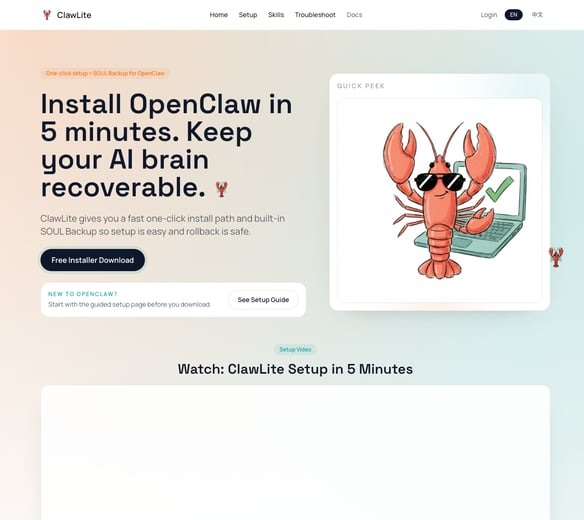
Beginners should choose the setup route that minimizes activation friction, not the route with the most knobs on day one.
Step 2: Install from a trusted source
Use official or clearly trustworthy sources only.
Recommended references:
- OpenClaw docs: https://docs.openclaw.ai
- OpenClaw GitHub: https://github.com/openclaw/openclaw
- ClawLite: https://clawlite.ai
At this stage, your goal is simple:
- download the correct package
- run the installer or setup flow
- avoid unnecessary customization
Beginners often lose momentum by trying to optimize too early. Default settings are usually the right call for the first run.
Step 3: Keep your first setup session boring
This is where many beginner guides fail. They show you the exciting possibilities before your core setup is stable.
For your first session, avoid:
- adding multiple providers at once
- connecting several channels immediately
- changing too many defaults
- testing advanced automations before the basics work
A boring first session is a good first session.
What you want is a stable base, not a maximally personalized environment in the first 20 minutes.
Step 4: Connect your model route or API key
This is where “installation complete” often turns into “I have no idea if this actually works.”
Whatever path you choose, confirm one model route and stick with it for your first setup.
Best practice for beginners:
- choose one provider or API key path
- verify the credentials once
- do not mix several options on day one
- test immediately after connecting
This is also where ClawLite’s cost framing helps.
Instead of forcing beginners to separate setup decisions from pricing decisions, it supports a simpler story:
- BYOK if you want maximum cost control
- cheaper-token usage if you want a lower-cost hosted path
- lower friction while you are still deciding whether the workflow fits you
The real value is not “cheap” by itself.
The real value is lower cost without activation collapse.
Step 5: Run one useful beginner test
Do not stop when the installer finishes. Stop when a real task succeeds.
Try one of these:
- summarize a short article
- ask the assistant to answer a simple question
- run one tiny workflow you can verify in under a minute
What you are checking:
- the app launches correctly
- your provider or API route is connected
- the assistant responds without obvious configuration errors
- you can repeat one simple useful task
Suggested screenshot placement
Screenshot 2: First successful response Placement: after Step 5 Suggested capture: the first successful summary, answer, or workflow result Suggested caption: The goal of beginner setup is not just installation. It is proof that your first useful task works.
Step 6: Save your working baseline before customizing more
Once the first task works, pause before expanding.
Document your baseline:
- what install path you used
- what provider or API route worked
- what first task succeeded
- what default settings you kept
This matters because if you later add tools or integrations and break something, you still know what your clean working setup looked like.
Common beginner mistakes during OpenClaw setup
Mistake 1: confusing installation with setup
Installing files is not the same as setting up a working assistant.
Mistake 2: adding complexity before first success
A beginner should not start with maximum feature depth.
Mistake 3: choosing the most manual route by default
More control is not always better if your real goal is fast activation.
Mistake 4: treating price as a separate issue
Cost anxiety shows up early. If setup already feels fragile, pricing feels worse. If setup feels clear, pricing becomes easier to evaluate rationally.
Mistake 5: never defining what “working” means
If you do not choose a first test, you may not know when your setup is actually done.
Direct OpenClaw setup vs ClawLite setup for beginners
| Criteria | Direct OpenClaw Setup | ClawLite Setup Path |
|---|---|---|
| Best for | Technical users | Beginners, founders, speed-focused users |
| Setup effort | Higher | Lower |
| First-run confidence | Depends on user skill | Usually higher for beginners |
| Cost entry point | DIY decisions | BYOK free or cheaper-token path |
| Speed to first useful result | Variable | Usually faster |
| Core value | Maximum manual control | Reduced setup friction without losing OpenClaw power |
The honest answer is not that one option is universally correct.
The honest answer is that most beginners asking for an openclaw setup guide do not want the most manual path. They want the most trustworthy path to a working assistant.
What to do after beginner setup is complete
Once your base setup works, expand in this order:
1. Repeat the same small task once more
This confirms the result was not a lucky one-off.
2. Add one realistic use case
For example:
- research help
- writing support
- a tiny automation
- a basic team or founder workflow
3. Learn pricing before you scale usage
If you plan to use OpenClaw regularly, understand your real cost model early.
A practical beginner rule:
- if you want full flexibility and already have keys, BYOK is attractive
- if you want a simpler low-cost route, cheaper tokens can make sense
- always think in cost per successful workflow, not just a headline price number
4. Only then move into advanced setup
Channels, integrations, and larger automations come after you have a stable baseline.
Final recommendation
If you are a beginner, the best OpenClaw setup guide is not the one with the most technical detail. It is the one that gets you to a working result with the least confusion.
That means:
- choose the setup path with the fewest early decisions
- install from trusted sources
- connect one clear provider or API route
- run one small real task immediately
- avoid advanced customization until your baseline works
If you want the simplest truthful beginner framing, it is this:
OpenClaw gives you the power. ClawLite reduces the setup tax.
And for many first-time users, that is exactly what makes the setup manageable.